
A Chrome extension that puts AI teaching tools inside Google Docs and Classroom.
Pricing
Verified 14 Jul 2026· sourceOverview
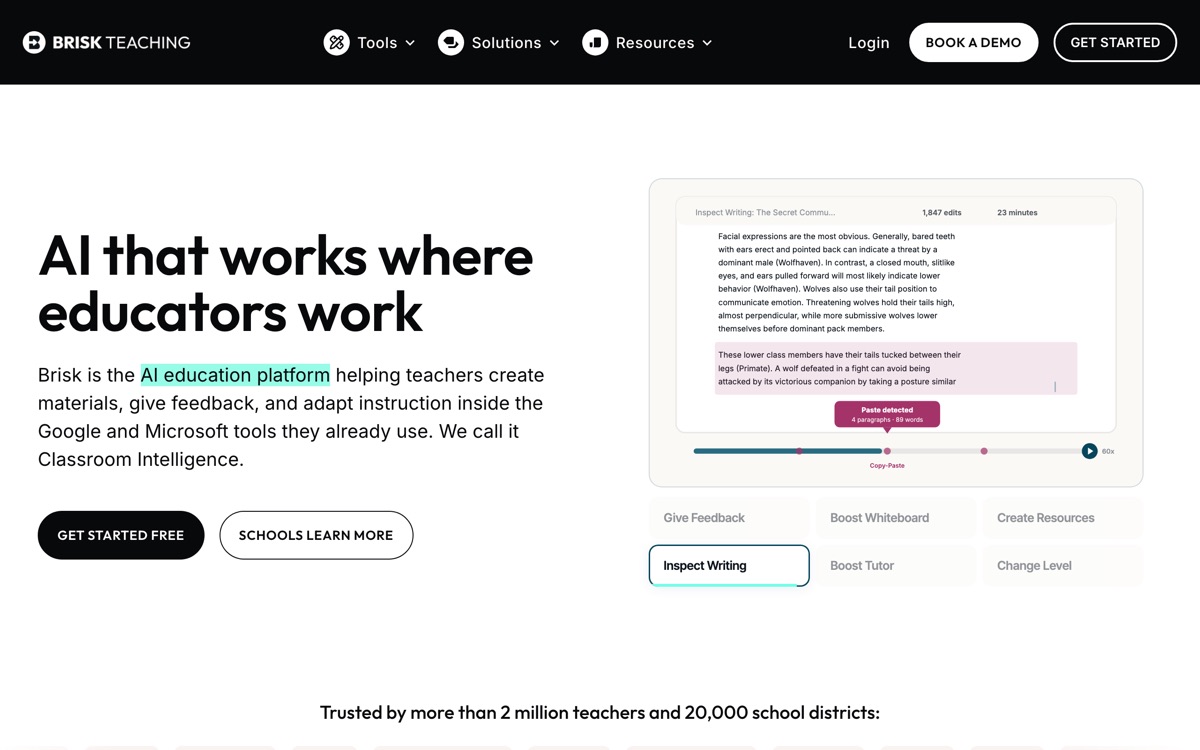
Brisk's design decision is the point: rather than another tab to visit, it lives as a Chrome extension inside the tools teachers already have open — Google Docs, Google Classroom, Microsoft Office, Canvas, even YouTube. Highlight a text and change its reading level, generate a quiz from a video, leave feedback across a stack of student essays in one pass, or turn an article into slides. Its most distinctive feature is Inspect Writing, which replays a Google Doc's editing history as a video, letting a teacher see how a piece was written — a blunt but genuinely useful signal in an era when a finished essay tells you very little about who wrote it. There is a free tier and paid plans above it. The limits: it is tied to Chrome, so a school on other browsers is out; the writing-process replay is evidence, not proof, and treating it as an AI-detection verdict would be unfair to students; and, as with all of these, the generated feedback is a draft a teacher must own.
Features
Pros & cons
Pros
- Works where teachers already are instead of demanding another platform
- Batch feedback saves genuinely significant marking time
- Writing-process replay is a smart, practical response to AI-written essays
Cons
- Chrome-only — no use to schools on other browsers
- Writing-history replay is suggestive evidence, not proof of authorship
- Free tier caps usage; heavy users hit the paywall quickly
- Generated feedback is generic unless the teacher rewrites it
Who Brisk Teaching is for
Brisk Teaching is built for people working with education tools. Its free plan makes it easy to evaluate before paying, which suits both individuals and growing teams. Users most often highlight works where teachers already are instead of demanding another platform.
How Brisk Teaching compares in AI Education Tools
Within education tools, the closest alternatives to Brisk Teaching are Khanmigo, MagicSchool AI, Curipod — it is worth comparing them side by side on price and the specific features you need before deciding.
Brisk Teaching pricing
Brisk Teaching offers a free plan with paid upgrades. You can start for free and pay only when you need higher limits, advanced features or team seats. See the full Brisk Teaching pricing breakdown →
Brisk Teaching FAQ
Is Brisk Teaching worth it?
Brisk Teaching is most often praised for works where teachers already are instead of demanding another platform. The main trade-off is that chrome-only — no use to schools on other browsers. For most education tools needs it is a credible choice — trial it against one or two alternatives before you commit. ToolsPantry does not yet carry user reviews for this tool.
Is Brisk Teaching free?
Brisk Teaching offers a free plan with paid upgrades. You can start for free and pay only when you need higher limits, advanced features or team seats.
What are the downsides of Brisk Teaching?
The most commonly noted drawbacks are: Chrome-only — no use to schools on other browsers; Writing-history replay is suggestive evidence, not proof of authorship; Free tier caps usage; heavy users hit the paywall quickly; Generated feedback is generic unless the teacher rewrites it. None are dealbreakers for everyone, but weigh them against your specific workflow.
What are the best alternatives to Brisk Teaching?
Strong alternatives in education tools include Khanmigo, MagicSchool AI, Curipod, Socratic. See the full ranked list on the Brisk Teaching alternatives page.
The verdict
Brisk Teaching is a education tools option, best known for works where teachers already are instead of demanding another platform. The main trade-off is that chrome-only — no use to schools on other browsers. Start on the free plan and compare it against the alternatives below before committing.
Embed a badge
Show visitors Brisk Teaching is on ToolsPantry. Paste this into your site — it links back here. About badges →
<a href="https://toolspantry.com/tools/brisk-teaching" target="_blank" rel="noopener">
  <img src="https://toolspantry.com/tools/brisk-teaching/badge" alt="Brisk Teaching on ToolsPantry" width="252" height="60" />
</a>