
Generative tool for early-stage residential floor plans and zoning-aware layout exploration.
Pricing
Verified 15 Jul 2026Overview
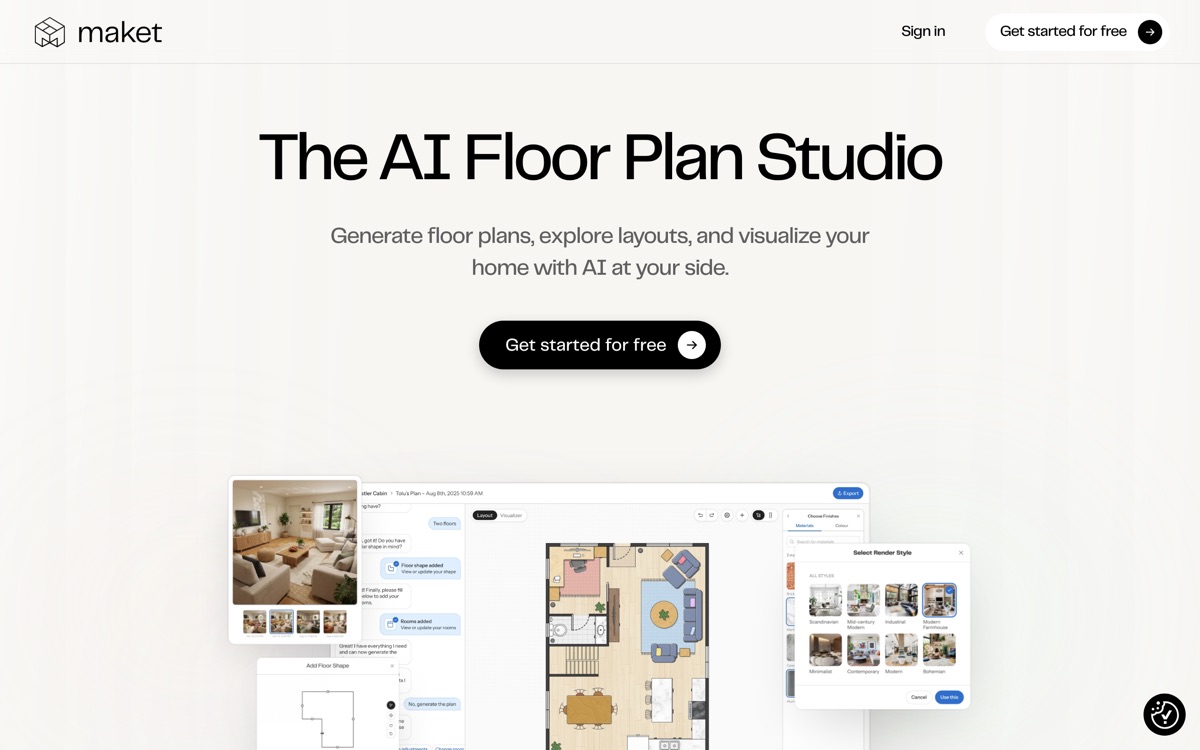
Maket is a different animal from the photo-restyle apps in this batch: instead of restyling a room image, it generates 2D residential floor-plan layouts from written constraints — room counts, adjacencies, dimensions — and aims at architects, builders and developers doing early schematic exploration. It also offers renderings and a design-assistant chat for questions about materials and regulations. The pitch is speed at the concept stage: describe requirements in plain language and get many plan variations to react to, rather than drawing each by hand. That makes it genuinely useful for rapid ideation and for showing clients options early. The honest limits: these are schematic starting points, not permit-ready construction documents, and they need a qualified architect or engineer to validate, detail and bring up to local code before anything is built. The AI does not replace structural, accessibility or zoning judgment, and regulatory guidance it offers should be verified against the actual jurisdiction. Best understood as a brainstorming and client-facing concept accelerator, not a CAD or documentation replacement.
Features
Pros & cons
Pros
- Rapidly generates many floor-plan options at the concept stage
- Plain-language input instead of manual drafting
- Useful for showing clients early alternatives quickly
Cons
- Outputs are schematic concepts, not permit-ready construction documents
- Requires a qualified architect or engineer to validate and detail plans
- Regulatory and code guidance must be checked against the real jurisdiction
- Not a replacement for CAD, structural or accessibility engineering
Who Maket is for
Maket is built for people working with architecture & interior design tools. Its free plan makes it easy to evaluate before paying, which suits both individuals and growing teams. Users most often highlight rapidly generates many floor-plan options at the concept stage.
How Maket compares in AI Architecture & Interior Design Tools
Within architecture & interior design tools, the closest alternatives to Maket are REimagine Home, Collov AI, Interior AI — it is worth comparing them side by side on price and the specific features you need before deciding.
Maket pricing
Maket offers a free plan with paid upgrades. You can start for free and pay only when you need higher limits, advanced features or team seats. See the full Maket pricing breakdown →
Maket FAQ
Is Maket worth it?
Maket is most often praised for rapidly generates many floor-plan options at the concept stage. The main trade-off is that outputs are schematic concepts, not permit-ready construction documents. For most architecture & interior design tools needs it is a credible choice — trial it against one or two alternatives before you commit. ToolsPantry does not yet carry user reviews for this tool.
Is Maket free?
Maket offers a free plan with paid upgrades. You can start for free and pay only when you need higher limits, advanced features or team seats.
What are the downsides of Maket?
The most commonly noted drawbacks are: Outputs are schematic concepts, not permit-ready construction documents; Requires a qualified architect or engineer to validate and detail plans; Regulatory and code guidance must be checked against the real jurisdiction; Not a replacement for CAD, structural or accessibility engineering. None are dealbreakers for everyone, but weigh them against your specific workflow.
What are the best alternatives to Maket?
Strong alternatives in architecture & interior design tools include REimagine Home, Collov AI, Interior AI, RoomGPT. See the full ranked list on the Maket alternatives page.
The verdict
Maket is a architecture & interior design tools option, best known for rapidly generates many floor-plan options at the concept stage. The main trade-off is that outputs are schematic concepts, not permit-ready construction documents. Start on the free plan and compare it against the alternatives below before committing.
Embed a badge
Show visitors Maket is on ToolsPantry. Paste this into your site — it links back here. About badges →
<a href="https://toolspantry.com/tools/maket" target="_blank" rel="noopener">
  <img src="https://toolspantry.com/tools/maket/badge" alt="Maket on ToolsPantry" width="252" height="60" />
</a>Alternatives to Maket
Simple open-source-rooted room redesign tool: upload a photo, pick a theme, get restyled variants.

AI rendering tool that turns architectural sketches and models into styled visualisations.
AI interior and exterior redesign aimed at real-estate marketing and virtual staging.